
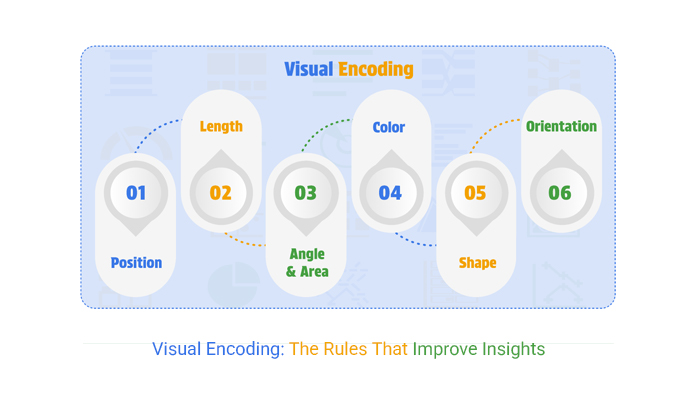
Visualisation is not just about making charts look attractive. It is about making data readable at speed. The core mechanism that makes this possible is visual encoding—the deliberate mapping of data values to visual properties such as position, length, size, shape, and colour. When done well, visual encoding helps people see patterns, compare values, and spot exceptions without needing to read every number. When done poorly, it can mislead, overwhelm, or hide the truth in plain sight. This is why visual encoding sits at the centre of modern analytics and reporting, and why learners in a data analyst course in Chennai often spend significant time practising how to choose the right encodings for the right questions.
What Visual Encoding Really Means
At its simplest, visual encoding is a translation step. You start with a dataset (sales by region, customer churn over months, defect rates by factory line). Then you decide how each variable should appear on the screen:
- A number can become a bar length.
- A category can become a colour or a position on an axis.
- A time series can become a line with points across dates.
- A proportion can become a slice in a pie (though often there are better options).
Every chart is a bundle of these decisions. The chart type is only the container. The real “work” happens in the encodings that control how accurately a viewer can compare values.
Choosing the Right Visual Channels
Not all visual channels are equal. Some are naturally easier for humans to interpret. In general, people compare position and length more accurately than area or angle. This is one reason why bar charts are so effective for comparisons, while pie charts can be harder for precise judgement.
Common channels include:
- Position: Best for accurate comparisons (scatter plots, dot plots).
- Length: Excellent for magnitude (bar charts).
- Colour hue: Useful for categories, but risky if overused.
- Colour intensity (light to dark): Good for ordered values (heatmaps).
- Size/area: Works for rough magnitude (bubble charts), but can distort perception.
- Shape: Helpful for small sets of categories; becomes confusing at scale.
A practical rule is to match the channel to the task. If the audience needs exact comparisons, choose position or length. If the task is to identify broad clusters or hotspots, colour intensity may be enough.
Mapping Shapes and Colours Without Confusing the Viewer
Shapes and colours are powerful because they can encode multiple variables at once. But they can also overload the viewer if applied without restraint.
Colour: categories vs quantities
- Use distinct hues for categories (for example, product types).
- Use sequential colour scales (light to dark) for quantities (for example, conversion rate).
- Use diverging scales (two hues split around a midpoint) for values above and below a reference point (for example, profit vs loss).
Avoid using too many colours. If everything is highlighted, nothing is highlighted. In dashboards, reserve strong colours for exceptions, alerts, or key comparisons.
Shape: clarity over variety
Shapes work best when there are only a few categories and the chart is not crowded. In a scatter plot with hundreds of points, shape changes become hard to notice. In that case, colour or small multiples may be better.
These judgement calls are exactly what separates a chart that “looks fine” from a chart that genuinely improves decision-making—skills that are repeatedly reinforced in a data analyst course in Chennai through real dashboards and business reporting exercises.
Common Visual Encoding Mistakes and How to Avoid Them
Even experienced teams make avoidable encoding errors. Here are some high-impact ones:
- Using colour for precision: Colour is not a precise measurement tool. If accuracy matters, rely on position/length and use colour only for grouping or emphasis.
- Dual meanings for the same colour: If blue sometimes means “Region A” and elsewhere means “Good performance,” viewers will get confused quickly.
- Non-zero baselines in bar charts: Truncated axes can exaggerate differences and harm trust.
- Overplotting in scatter charts: Too many points on top of each other can hide patterns. Use transparency, jittering, or aggregation.
- 3D charts: They distort perception and add visual noise. Most business questions do not require them.
Good encoding is often about restraint: fewer variables per chart, clearer legends, and consistent design choices across a report.
Practical Examples From Real Analytics Work
Consider a retail manager tracking store performance:
- Sales by store: A bar chart with length encoding is ideal for comparison.
- Sales trend over 12 months: A line chart uses position over time, making seasonality easy to see.
- Profit margin by category: A dot plot can outperform bars if space is limited and precision is needed.
- Region-wise performance map: Colour intensity can show hotspots, but the legend and scale must be carefully chosen to avoid false drama.
Similarly, in product analytics, churn risk might be encoded using colour intensity in a table, while customer segments may be encoded using distinct hues. The key is to keep the mapping stable: one meaning per colour scale, one meaning per shape set, and consistent choices across the dashboard.
Conclusion
Visual encoding is the difference between “a chart” and “a clear message.” It is the skill of translating data into visual signals that the brain can interpret quickly and correctly. The best encodings match the viewer’s task, use strong channels like position and length for comparisons, and apply shapes and colours with discipline. Whether you are building a KPI dashboard or presenting analysis to stakeholders, thoughtful encoding reduces confusion and improves decisions. If you want to build strong instincts for these choices—beyond memorising chart types—a data analyst course in Chennai can help by giving repeated practice with real datasets, real constraints, a
